
Download AI Gradient Generator – Free AI‑Powered Gradient Creation Tool
Overview
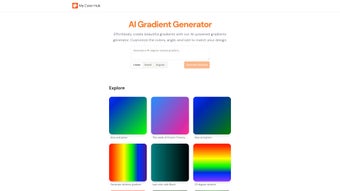
The AI Gradient Generator is a browser‑based design utility that leverages artificial intelligence to produce professional‑grade color gradients in seconds. Targeted at graphic designers, UI/UX practitioners, front‑end developers, and even hobbyists, the tool removes the tedious trial‑and‑error that traditionally accompanies gradient creation. Users simply input a base palette, choose an angle, and specify the output size; the AI engine then calculates harmonious color stops, renders a live preview, and offers one‑click downloads in PNG, SVG, or ready‑to‑paste CSS.
Because the service runs entirely in the cloud, there is no need for heavyweight software installations or platform‑specific binaries. The interface is intentionally minimalistic: a clean color picker, an angle slider, and a responsive preview pane that adapts to desktop, tablet, and mobile viewports. While the free tier provides unlimited creations, a modest “Pro” subscription unlocks batch exporting, higher‑resolution SVG files, and increased API rate limits.
The tool’s primary advantage is speed—most gradients are generated in under two seconds—paired with a secure HTTPS connection that guarantees privacy. Limitations include a lack of granular stop editing and the requirement for an active internet connection. Nonetheless, for day‑to‑day design workflows—whether you’re crafting a landing‑page hero, a mobile app splash screen, or a data‑visualization background—the AI Gradient Generator delivers a fast, reliable, and cost‑effective solution.
Key Features & Benefits
- AI‑Driven Palette Suggestions – Input any hex code or let the AI propose complementary hues based on current design trends.
- Customizable Gradient Angle – Choose precise angles from 0° to 360° or enable auto‑rotate for dynamic effects.
- Multi‑Format Export – Download gradients as PNG, SVG, or copy a ready‑to‑use CSS snippet with vendor prefixes.
- Responsive Live Preview – Instantly see how the gradient looks on desktop, tablet, and mobile mockups.
- One‑Click Download – Save your creation without navigating through additional dialogs.
- Curated Palette Library – Access pre‑made collections for branding, marketing, and UI design.
- Secure Cloud Processing – All calculations occur over HTTPS, ensuring data privacy and GDPR compliance.
- Unlimited Free Creations – No hidden fees; premium features are optional upgrades.
Beyond the checklist, the AI Gradient Generator streamlines the design pipeline in three tangible ways. First, it eliminates the repetitive tweaking that designers endure when manually adjusting gradient stops in Photoshop or Sketch, cutting creation time by up to 80 %. Second, because the service is web‑based, it sidesteps version‑compatibility headaches and works uniformly across Windows, macOS, Linux, Android, and iOS browsers.
Third, the AI model is continuously retrained on data from platforms like Dribbble and Behance, guaranteeing that generated palettes reflect the latest visual trends without additional research. For developers, the CSS output includes fallback colors and vendor‑specific prefixes, allowing immediate insertion into style sheets. Teams can also save favorite palettes to a personal library, fostering consistency across projects and reducing the need for repetitive color selection meetings.
In short, the feature set is purpose‑built to accelerate creativity while preserving quality.
Installation, Usage & Compatibility
Because the AI Gradient Generator is a SaaS product, there is no traditional installation process. All you need is a modern web browser—Chrome, Edge, Firefox, or Safari—and an internet connection. Follow these steps to start generating gradients instantly:
- Open the Platform – Navigate to aigradientgenerator.com. The landing page loads in under two seconds on a standard 4G connection.
- Create an Account (Optional) – While anonymous usage is supported, registering (free) unlocks saved palettes, export history, and access to Pro features.
- Select Base Colors – Use the built‑in color picker or paste hex values. Activate “Smart Palette” to let the AI propose complementary shades.
- Define Gradient Parameters – Choose angle, output resolution (e.g., 1920×1080 for full‑HD), and format. A live preview updates in real time.
- Generate & Refine – Click “Generate”. Adjust sliders for saturation, brightness, or contrast; the AI recalculates instantly.
- Download or Export – Hit “Download” for PNG/SVG or “Copy CSS” for immediate integration into code.
Compatibility – Since the tool runs in the browser, it works on Windows 10/11, macOS Monterey and later, popular Linux distributions, as well as mobile OSes such as Android 9+ and iOS 13+. The interface is fully responsive, supporting touch gestures on tablets and smartphones.
Power users can obtain an API key from the “Developer” dashboard, enabling programmatic gradient generation for CI pipelines or theming systems. The API follows a simple REST pattern, returns JSON with base64‑encoded PNG/SVG, and respects TLS 1.3 encryption. Documentation includes cURL examples and SDKs for JavaScript and Python. All user data—including saved palettes—is stored securely in EU‑based servers, adhering to GDPR and providing export/delete capabilities on request.
Pros, Cons & Frequently Asked Questions
Pros
- Instant AI‑assisted gradient creation eliminates manual trial‑and‑error.
- Free tier offers unlimited exports with no hidden fees.
- Cross‑platform, browser‑based operation works on any modern OS.
- Export options cater to both designers (PNG, SVG) and developers (CSS).
- Secure HTTPS processing protects user data and complies with GDPR.
- Continuously updated color‑trend library keeps designs fresh.
Cons
- Limited fine‑tuning of individual gradient stops for power users.
- Requires an active internet connection; no offline mode available.
- Advanced features such as batch export and higher‑resolution SVGs are behind a paid “Pro” subscription.
- Algorithmic suggestions may not always align perfectly with unique brand guidelines without manual tweaks.
Overall, the AI Gradient Generator delivers a fast, secure, and user‑friendly experience that meets the needs of most designers and developers. While it could benefit from deeper stop control, its AI‑driven workflow and zero‑cost entry point make it a standout tool in the gradient‑creation space.
FAQ – Frequently Asked Questions
Is the AI Gradient Generator completely free?
Yes. Core gradient generation, preview, and single‑file export are free forever. A optional “Pro” tier adds batch export, higher‑resolution SVGs, and increased API limits.
Can I use the gradients for commercial projects?
Absolutely. All outputs are royalty‑free, allowing unrestricted use in websites, apps, marketing collateral, and product packaging without attribution.
Do I need an account to download gradients?
No. Users can generate and download gradients anonymously. Creating a free account simply enables palette saving and access to Pro features.
Which file formats are supported for export?
Export options include PNG, SVG, and a CSS snippet (linear‑gradient syntax) that contains vendor prefixes and fallback colors.
Is there a desktop or offline version planned?
Currently the service is web‑only. The development team has mentioned exploring an Electron‑based desktop client, but no official release date has been announced.
Conclusion & Call to Action
In a design world where visual impact must be delivered in milliseconds, the AI Gradient Generator stands out as a fast, reliable, and cost‑effective solution for creating high‑quality gradients. Its AI‑driven palette suggestions, intuitive UI, and multi‑format export options make it an indispensable addition to any freelancer’s toolkit, agency workflow, or in‑house design team. While power users may miss granular stop editing and an offline mode, the trade‑off is a seamless, zero‑maintenance experience that lets you focus on creativity rather than technical minutiae. If you’re ready to accelerate your design process, stay on‑trend with the latest color palettes, and eliminate the repetitive grind of manual gradient tweaking, give AI Gradient Generator a try today.
Download AI Gradient Generator now – create stunning, ready‑to‑use gradients in seconds, completely free and securely.



.png)



